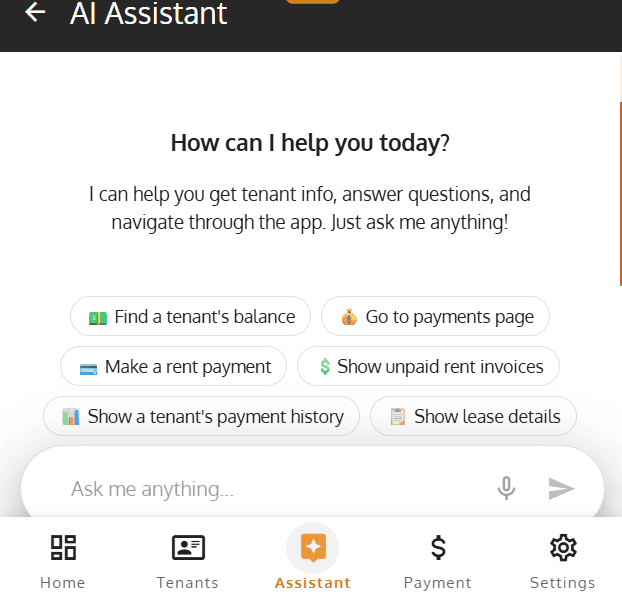
What AI Can Do
Answers, visuals, videos, and guided steps - without leaving your workflow.
Answer Questions
Chat naturally with the AI and receive instant answers about every Seamless Tenants feature.
Visual Walkthroughs
The assistant explains each feature using screenshots from the application.
Demo Videos
Watch related demo videos without leaving the conversation.
Step-by-Step Guides
Receive easy instructions with numbered steps for every property management task.
Smart Navigation
The AI tells users exactly where each feature is located inside the application.
Always Available
24/7 instant assistance without waiting for support.
AI Assistant
How do I Create or Schedule a Property Showing?
Showing: Create property Showing

User
How do I create or schedule a property showing?
AI
1. Click Showings under General Section
2. Click Create Showing +
3. Fill the Details
4. Click Save
Screenshot Preview
Related Demo Video
Ask it anything your team needs to learn.
🏠 Create a Property
👤 Add a Tenant
💵 Record a Payment
📄 Create Lease
🔧 Maintenance Requests
📅 Schedule a Showing
📊 View Reports
📈 Income vs Expenses
📨 Send Owner Statement
🤖 Explain Feature
Every answer comes in the format your team needs.
Text Answers
Clear explanations written in simple language.
Screenshot Guides
Step-by-step screenshots highlighting buttons and menus.
Demo Videos
Embedded YouTube tutorials that explain the feature visually.
⚡ Instant Answers
📸 Visual Tutorials
🎥 Demo Videos
😊 Faster Learning
From question to solved in one guided flow.
Ask any Question
Understands Request
Generates Instructions
Shows Screenshots
Suggests Demo Video
Problem Solved
Learn Faster
Reduce training time for property managers and staff with instant, contextual answers.
AI + Dashboard
Chat interface
Smarter Support
No need to search documentation. Get answers instantly inside the product conversation.
Built Into Seamless Tenants
The AI understands every feature of your property management software and points people to the right place.
Dashboard with AI overlay
How the AI Assistant handles your data.
Only what you can see
Every lookup checks the same permissions as the matching screen, so it can’t show records your role can’t open.
Sent to an AI provider
To answer, it sends your question and the records it looks up to a third-party AI model through OpenRouter.
No SSNs or bank details
No sensitive data, such as SSNs or bank details, is ever sent.
Chats aren’t saved
Conversations aren’t stored in your account and clear when you reload or close the page. We only keep your questions in our server logs to troubleshoot problems.
FAQs
